








Anonymous visitors can generate three times per UTC month. Registered free users receive three generations per UTC day. Free generations accept up to 500 characters; paid plans accept up to 5,000 characters per generation.
Politician
Donald TrumpText to Speech
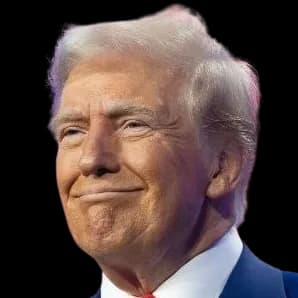
Turn your text into a Donald Trump-style AI voice for a clearly labeled fictional skit, gaming clip, or greeting. Preview the voice, then open the studio with it selected to generate your script. Free use has limits; generated MP3 downloads require a paid plan.
Listen to the preview free. Downloading generated audio requires a paid plan. View plans
How to turn your text into AI speech
Open the existing text-to-speech studio to generate your own script. Listen to the generated result before deciding whether to revise or download it.
- 1
Open the studio and confirm the voice
Use the generation link or an original script example. Confirm that the requested voice is selected; if it is unavailable, choose another voice explicitly or return later.
- 2
Edit your text and supported settings
Write or revise your script, choose an available model, and adjust the supported voice settings. Free generations accept up to 500 characters; paid plans accept up to 5,000.
- 3
Generate, listen, and choose whether to download
Generate speech and listen to the result. Processing time and delivery can vary. Online generation follows your free quota; downloading generated MP3 audio requires a paid plan.
Hear the Donald Trump AI Voice
This prerecorded voice preview is a reference for the delivery. It is not a recording of the example scripts on this page or a guarantee that a new generation will sound identical. Open an example in the studio to generate and listen to that text.
Try Donald Trump text to speech with an original script
Choose a fictional short-video intro, game line, or greeting to open the studio with Donald Trump selected and the text filled in. These scripts are original examples, not real statements or preview transcripts.
Fictional cooking intro
“We are making a sandwich today. A very ambitious sandwich. Three layers, a little crunch, and absolutely no boring bites.”
Use ExampleGaming narration
“That was a big jump. A beautiful jump. The landing needs some work, but the jump itself was outstanding.”
Use ExampleBirthday greeting
“Happy birthday, Jordan. A fantastic day for cake, for friends, and for taking the largest slice. Enjoy every minute.”
Use ExampleVideo Support
Video Templates
Select voices like Trump also support AI video generation with lip-sync.
Try Other Celebrity Voices
Donald Trump text to speech lets you turn original fictional scripts into an AI-style voiceover. Listen to the prerecorded sample, then open the studio with the voice selected to generate your text. This guide focuses on wording, pacing, and reviewing the result before using it in a clearly labeled edit.
What Makes the Trump Voice So Distinctive
Donald Trump's speaking style uses a punchy baritone, changes in emphasis, repetition, and pauses before key phrases. These are useful writing cues for a fictional character-style script.
Try a short sentence with one clear point of emphasis, then listen to the generated result. The delivery varies with the script and settings; no accuracy percentage or identical rendition is promised.
How to generate Donald Trump text to speech
Open the existing studio with the generation link or an original example script:
- Confirm that Donald Trump is selected. If the voice is unavailable, choose another voice explicitly or return later.
- Write or edit a fictional script. Free generations accept up to 500 characters; paid plans accept up to 5,000.
- Choose the available model and supported settings, then generate and listen. Processing time can vary.
- Compare the same short sentence with different punctuation or speed settings to adjust its pacing.
- Anonymous visitors receive three generations per UTC month; registered free users receive three per UTC day. Generated MP3 downloads require a paid plan.
What Creators Use the Trump AI Voice For
Try an original, clearly fictional script for one of these uses:
- Gaming reactions: describe a missed jump or a surprising result in your own words.
- Fictional skits: write a comic scene about an everyday subject without presenting it as a real statement.
- Video narration: generate a short line and compare its timing against the footage in your editor.
- Greetings: personalize a birthday line while making clear that the audio is synthetic.
Writing Tips: Make Your Script Sound More Like Trump
Use these writing cues as starting points for an original fictional script, then listen to the generated delivery before deciding what to keep:
- Use superlatives and absolutes: "the best", "like nobody has ever seen", "a total disaster".
- Repeat the key phrase at the end of a sentence: "It's huge. Absolutely huge."
- Add short parenthetical asides: "— and believe me, I know a lot about this —".
- Keep sentences short. Long academic sentences flatten the delivery; punchy fragments let the emphasis land.
- Address the audience directly: "everyone is saying it", "you know it, I know it".
AI voice impressions and responsible use
This is a Donald Trump-style AI impression, not an official recording or endorsement. Do not present generated audio as a real statement or use it to impersonate an authentic communication.
A paid download does not grant personality or endorsement rights. Check the permissions required for your intended use and label synthetic audio appropriately. Parody and fictional content are not automatically permitted in every context.
Donald Trump text to speech for original fictional scripts
Write a short fictional line, confirm the selected voice, and compare the pacing in the studio before using the result in an edit. Free online generation and listening are subject to quotas; downloading generated MP3 audio requires a paid plan.
Voice Technology FAQ
You can generate and listen online within your free quota. Downloading generated audio as an MP3 requires a paid plan.
Choose an original script on this page to open the studio with the text filled in. Confirm that Donald Trump is selected, generate speech, and listen before revising punctuation or speed. If the requested voice is unavailable, choose another voice explicitly or return later.
No. A paid plan provides the product features described on the pricing page; it does not grant third-party personality, character, music, or endorsement rights. This is an AI-style impression, not an official recording or endorsement. Check the permissions needed for your intended use and identify synthetic audio where required.
Ready to create with Donald Trump?
Generate My Audio NowListen to the preview free. Downloading generated audio requires a paid plan.