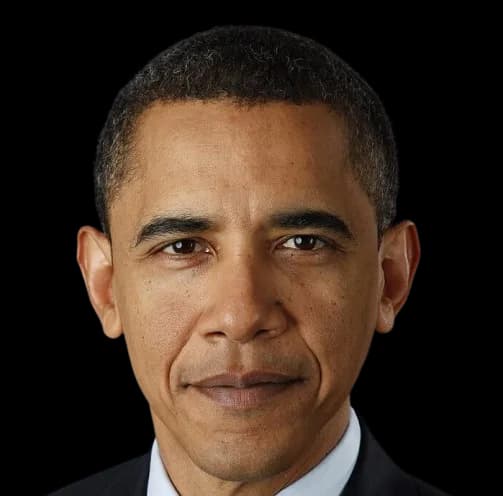
Barack ObamaGiọng nói AI
Tạo bài phát biểu phong cách Obama từ bất kỳ văn bản nào. Giọng điệu điềm tĩnh, thuyết phục và có nhịp điệu tự nhiên. Những giọng nói chọn lọc như Trump cũng hỗ trợ tạo video bằng AI với tính năng hát nhép.
Nghe bản mẫu miễn phí. Cần gói trả phí để tải âm thanh đã tạo. Xem các gói
3 bước đơn giản để tạo âm thanh chuyển văn bản thành giọng nói AI miễn phí
Không cần tải xuống hoặc cài đặt phức tạp. Hãy làm theo các bước đơn giản của chúng tôi để tạo âm thanh giọng nói tùy chỉnh ngay lập tức trên nền tảng của chúng tôi.
- 1
Dán văn bản và chọn giọng nói lý tưởng của bạn
Dán kịch bản vào ô nhập. Chọn giọng, sắc thái và ngôn ngữ phù hợp với dự án của bạn.
- 2
Điều chỉnh cài đặt giọng nói và xem trước
Tùy chỉnh tốc độ và âm thanh chỉ bằng một cú nhấp chuột. Xem trước âm thanh của bạn trong thời gian thực để đảm bảo hiệu ứng giọng nói phù hợp với nhu cầu của bạn.
- 3
Tạo và nghe thử trong vài giây
Bắt đầu tạo tức thì và nhận âm thanh của bạn sau vài giây. Nghe thử miễn phí trực tuyến, rồi xuất tệp MP3 cuối cùng với gói trả phí và sử dụng trên mọi nền tảng.
Thử các kịch bản Barack Obama này
Chạm vào một kịch bản để mở trong trình tạo, sẵn sàng chỉnh sửa và tạo.
Bài phát biểu truyền cảm hứng
“Vâng, chúng ta làm được. Bởi vì ở nước Mỹ, không có điều gì chúng ta không thể đạt được khi cùng chung tay như một dân tộc thống nhất.”
Sử dụng ví dụBài phát biểu chính sách
“Hãy để tôi nói rõ. Đây không phải chuyện chính trị. Đây là chuyện làm điều đúng đắn cho nhân dân Mỹ.”
Sử dụng ví dụHài hước nhẹ nhàng
“Tôi còn một điều cuối cùng muốn nói... Obama xin phép." *thả micro*”
Sử dụng ví dụNghe giọng AI của Barack Obama
Phát bản mẫu để nghe giọng AI của Barack Obama trước khi bạn tự tạo. Bản mẫu được tạo bằng chính mô hình có trong trình tạo miễn phí.
Mẫu Video
Những giọng nói chọn lọc như Trump cũng hỗ trợ tạo video bằng AI với tính năng hát nhép.
Hãy thử giọng nói của người nổi tiếng khác










The Barack Obama AI voice is a favorite for motivational edits, debate memes, and "AI presidents" videos alike. Few modern speakers have a more studied delivery — which is exactly what makes the voice so satisfying to generate. Here is what defines it, how to create your own Obama-style speech, and how creators put it to work.
What Defines Obama's Speaking Style
Obama's delivery is built on measured pacing and strategic silence. He speaks in a warm baritone, slows down ahead of key phrases, and uses deliberate pauses — sometimes mid-sentence — to let a point settle. Add the signature discourse markers ("Now, look…", "Let me be clear…") and a cadence that rises gently before resolving downward, and you have one of the most distinctive rhetorical fingerprints in modern speech.
Our model is tuned for that restraint: the pauses, the softened consonants, the sense that every sentence was drafted twice. It rewards scripts written as speeches rather than casual chatter.
How to Generate an Obama AI Voice (Step by Step)
The workflow takes less than a minute, right in the browser:
- Write your script — structured, speech-like sentences produce the most convincing output.
- Pick Turbo for quick memes or HD for broadcast-quality narration.
- Use the emotion control to shift between reflective, upbeat, and firm deliveries.
- Generate and preview free online (paid plans download MP3/WAV) — 3 free generations every day with a free account, no credit card.
- Want video? Pair the audio with the US Flag or TV Interview template for a lip-synced clip.
What Creators Use the Obama Voice For
Four formats dominate what people make with this page:
- "AI Presidents" gaming videos — Obama discussing Minecraft, Fortnite, or movie tier lists is an entire genre on TikTok and YouTube Shorts.
- Motivational edits — pairing generated narration with cinematic footage for graduation and self-improvement content.
- Debate and podcast parodies — often combined with our Trump and Biden voices for multi-speaker skits.
- Educational explainers — the calm, authoritative cadence suits history recaps and civic explainers surprisingly well.
Writing Tips: Draft Like a Speechwriter
A few habits instantly make output sound more like the real cadence:
- Open with a discourse marker: "Now, look —", "Here's the thing…", "Let me be clear:".
- Use the rule of three: "not because it is easy, not because it is quick, but because it matters."
- Write in full, balanced sentences — fragments undercut the measured rhythm.
- Insert commas where you want the signature pause; the model honors punctuation.
Parody, Politics, and Responsible Use
Voices of public figures are parody instruments, and with political figures the line matters more. Comedy, commentary, and clearly labeled AI content are the safe zone — the "AI presidents playing games" genre thrives precisely because nobody could mistake it for a real statement. Never use the voice for fake political statements, robocalls, or misinformation; several jurisdictions now explicitly regulate deceptive synthetic political audio. Keep it clearly comedic and labeled, and you are using the tool as intended.
Trình tạo văn bản thành giọng nói miễn phí tốt nhất với giọng nói AI của người nổi tiếng
Khám phá mẫu giọng nói theo phong cách Barack Obama và kịch bản mẫu. Xem các giọng khả dụng trong studio. Nghe mẫu miễn phí; tải âm thanh đã tạo cần gói trả phí.
Câu hỏi thường gặp về công nghệ giọng nói
Sẵn sàng sáng tạo với Barack Obama?
Tạo âm thanh của tôi ngay bây giờNghe bản mẫu miễn phí. Cần gói trả phí để tải âm thanh đã tạo.